
SEZHEL Flow
Work tracking and task managementFrom the first task
to the final approval.
Who is responsible, what needs doing, and when is it due? SEZHEL Flow brings tasks, assignees, submissions and approvals into a shared workspace.
SEZHEL Flow · Interactive tour
Take a task through to approval.
Assign a sample task, review its delivery and make the decision as a manager.
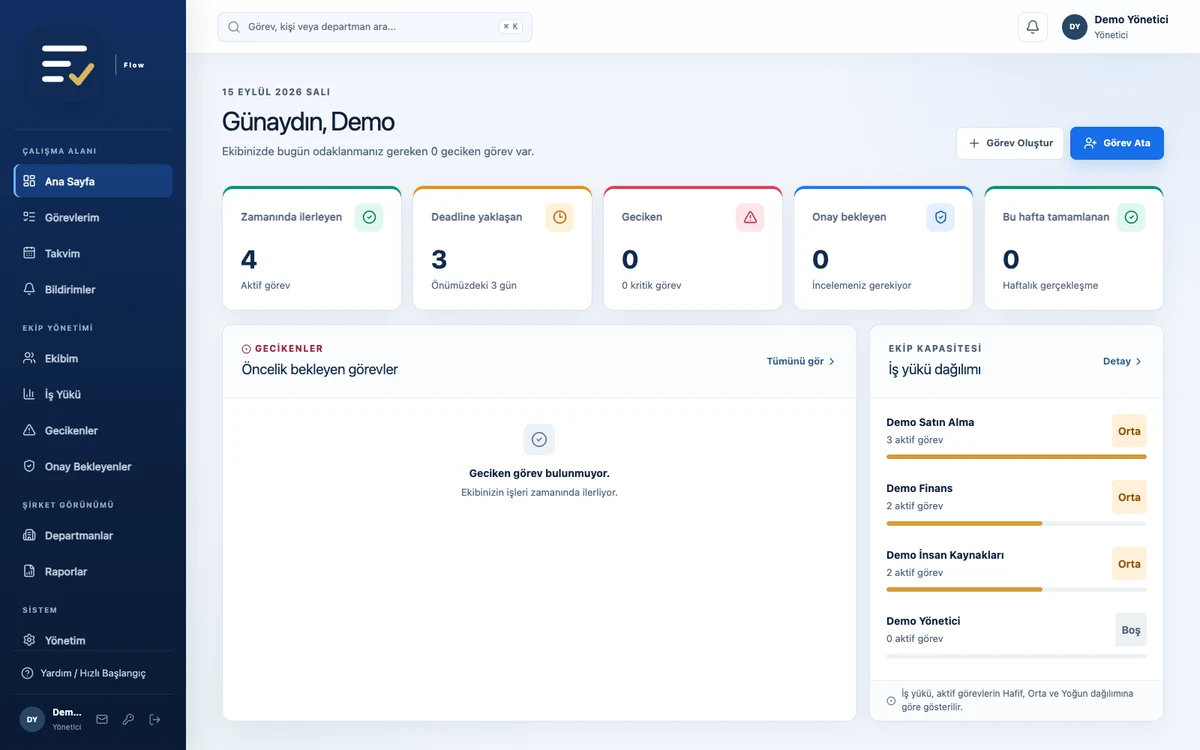
Real Flow screen with sample data. Select a marker to explore a stage. Turkish interface shown.
Define the work, its owner and deadline in one task.
Sample task
Monthly purchasing report
Compare supplier quotations and submit the monthly cost summary to your manager.
Illustrative workflow. Actions stay on this page.
Inside the product.
Real application screens with sample company data. Turkish interface shown.
A shared workspace for everyday operations.
Calendar and priorities
Follow start dates and deadlines in daily, weekly or monthly views. See upcoming and overdue work.
Teams and workload
Review team members’ active tasks alongside light, medium and heavy workload categories.
Recurring work
Schedule periodic tasks with recurrence rules. Save frequently used tasks and their checklists as templates.
Connected tasks
Define when a task depends on another being completed. Follow reassignments with their recorded reasons.
Role-based workspaces
Employees, managers and executives see tasks and team information within their access scope.
Filters and reports
Explore tasks by status, priority, person and department. Save views and download management reports as Excel-compatible CSV files.
Different departments. A shared view of the work.
For work shared across purchasing, finance, HR and administrative teams. Follow daily responsibilities, periodic preparation and work requiring manager approval in one place.
Before getting started
Can we use Flow on phones and tablets?
Yes. Flow is a web application that adapts to desktop, tablet and phone browsers. Supporting browsers can add it to the home screen. An internet connection or access to the network hosting the installation is required.
Can documents be included in submissions?
Installations with file uploads enabled support PDF, PNG, JPEG and TXT files attached to tasks and submission versions. Storage, file limits and security scanning are configured as part of the installation.
How do we introduce Flow to our company?
We first review your departments, user roles and a representative workflow. Together we define installation, data migration, notification and support scope, then plan a pilot.
After your demo request
Understand your workflow
Let’s discuss your team, current tracking method and the main problem you want to solve. We need your process and expectations; real customer or employee records are not required.
Follow a sample together
See task assignment, submission, revision and manager approval using a representative task. Review employee and manager views together.
Define the pilot and proposal
If the product fits, agree on users, deployment, data migration, training and support. We will set out the pilot acceptance criteria and proposal scope in writing.